


GameChanger
4.49.59K Reviews
App Specs
- Version
- 2026.13.0.1
- Updated On
- License
- Free
- Downloads
- 1,000,000+
- Developer
- GameChanger Media
- Categories
- Sports
- Platform
- Android, iOS
Screenshots

 Analysis by AppCompare
I find GameChanger most useful when a youth sports team needs one shared place to follow a game, keep its score, and keep people informed. The appeal is practical: a parent who cannot get to the field can still keep up, while the person scoring can record events as they happen. It is a sports app from GameChanger Media, and its 4.5 average across around 27,000 ratings suggests that many users find that combination worthwhile. I would think of it less as a replacement for being at the game and more as a way to connect the people who are there with those following from elsewhere.
Before the first pitch, tip-off, or update
The app makes the most sense when a team agrees in advance who will handle the scorekeeping and where families should look for updates. If every parent is already coordinating through separate chats, a shared team space can reduce the familiar scramble of asking who has the schedule or what happened in the last inning. That benefit depends on people actually using the same setup, though: a team still needs someone willing to enter the information and keep it current.
For a coach or team organizer, the useful starting point is getting the roster and schedule in order before game day rather than trying to assemble everything while people are arriving. Families can then use the app to follow along, and the person keeping score has a clearer job to focus on. I would treat this as a small workflow change, not a magic fix for every team-management problem. It helps most when one or two people take ownership instead of everyone assuming somebody else will post.
From live action to a useful record
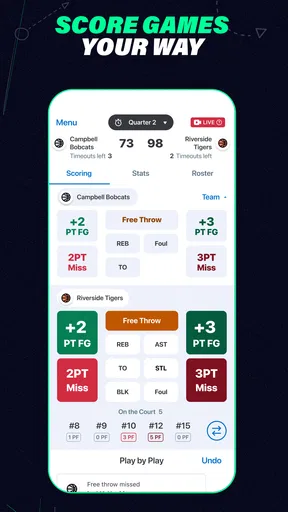
During a game, scorekeeping is the part that turns a stream of plays into something a team can revisit. Tapping in hits, runs, and outs gives the app material to generate stats, so the value is not limited to knowing the score at the final whistle. For a coach, that record can help make a post-game conversation more specific; for a player, it can make progress easier to discuss than a vague feeling that the game went well or badly.
There is a trade-off here that is easy to miss: the usefulness of those stats starts with accurate input. A scorekeeper who is distracted by the action may fall behind, and catching up later can be confusing if several plays have passed. I would choose a person who is comfortable following the game and tapping through events, then keep the role consistent when possible. If the job is too demanding for one volunteer, it is better to share the responsibility deliberately than to expect perfect detail from someone who is also coaching or watching closely.
How families receive the game
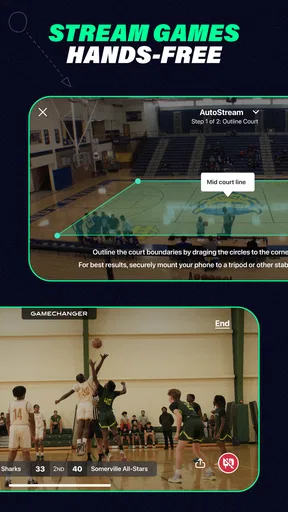
Live video is a welcome option for relatives who cannot attend, but a stream is only one way to follow what is happening. The live game tracker gives remote viewers another route when video is not available, which matters at a field where a reliable connection may be difficult. Before relying on a stream for an important game, I would check that the person responsible can set it up and that the connection works where the team is playing. A score feed can be more dependable than video in some situations, and it is still useful to someone who simply wants to know how the game is unfolding.
Sharing the viewing option with family can also take pressure off the parent who would otherwise be expected to send updates while trying to watch. It does not mean every relative needs a separate message after each play; people can follow along themselves. That is a modest but meaningful handoff: the scorer records events, the app makes the game easier to follow, and distant family members can check in without asking someone on the sideline to narrate the whole thing.
Worth Reading Before You Choose

Flipboard Shows What News Apps Must Do Beyond the Feed

Switching to Android Auto Means Rethinking Your Driving Routine

Google Calendar Makes a Crowded Week Easier to Manage

Ludo King Makes the Most of the Minutes Between Plans

Baby Panda World Brings Quick Play to Modern Phones, but Its Game Library Feels Busy

ESPN’s Live Game View Makes Following Close Games Easier
After the final play
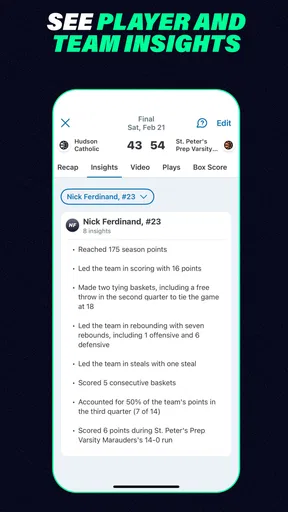
Once the game is over, the record and stats can give the team a starting point for reflection. I would use them as conversation aids rather than as a complete judgment of a young athlete. A number cannot explain every decision, effort, or circumstance in a game, and youth sports should not turn into a constant audit of performance. Used with some perspective, though, recorded details can help a player notice a trend and give a coach a concrete point to work on at practice.
Team communication also has a natural place before and after games. Announcements and messages can keep logistics and celebrations near the schedule and roster rather than scattered through several group texts. That can be especially helpful when a family has missed a change or joined the team mid-season. The practical test is whether the group checks the app consistently; if important information continues to appear only in private chats, the supposed central hub will not actually be central.
Who will get the most from it
I would recommend it first to families and volunteers involved in youth teams who want a shared game record, remote following, and fewer scattered updates. A parent who travels for work, a grandparent who lives far away, or a coach trying to keep team details organized can each have a clear reason to use it. The app is free to download, is rated for Everyone, and has more than a million installs. Its current version is 2026.2.0.0, and it supports operating systems from version 9 onward.
It is less compelling if you only want a basic clock or a simple score display and have no need for team coordination, stats, or remote access. A paper scorebook may be a better fit for a team that prefers a low-tech routine, while a regular messaging app may be enough for a group that only needs to share schedule changes. Compared with those alternatives, GameChanger’s main distinction is putting game tracking and team communication together; that convenience comes with the need to keep the shared information maintained.
What is GameChanger All About?
Let me break it down for you. GameChanger is an app designed to simplify scorekeeping, live streaming, and team management for youth sports. Whether it’s baseball, softball, or basketball, this app covers all bases. I’ve had my fair share of juggling scorebooks and keeping parents updated, and let me tell you, this app makes that whole process a breeze.
Features That Score Big
Alright, let’s talk features. First off, the scorekeeping function is top-notch. It’s intuitive, with easy navigation that even the least tech-savvy coach could master. You can track every hit, run, and out with a few taps, and the app automatically generates stats. Seriously, it’s like having a personal statistician in your pocket.
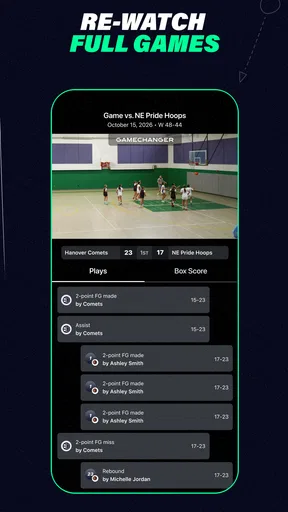
Then there’s the live streaming feature. Picture this: you’re stuck at work but want to catch your kid’s game. No problem. The app offers live streaming options so you can watch the game in real-time. It’s not just video either; you can follow along with a live game tracker if video isn’t available. Plus, you can share the stream with family and friends who couldn’t make it to the game. Talk about a win-win!
Team Management Made Easy
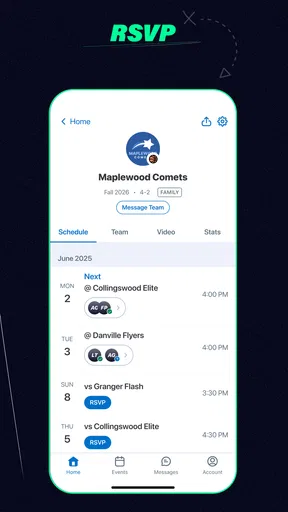
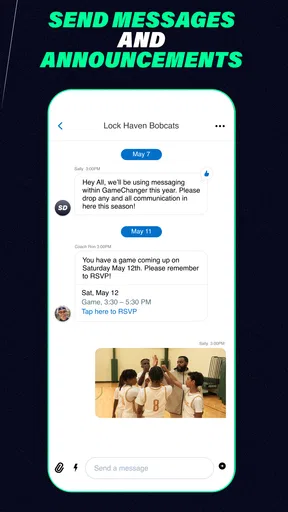
Managing a team can be chaotic, but GameChanger has tools to bring order to the madness. You can organize rosters, schedule games, and even send announcements directly through the app. No more endless group texts or last-minute phone calls. The calendar sync feature is especially handy to keep everyone on the same page.
And let’s not overlook the messaging feature. It’s like having a team chat room where you can discuss strategies, share photos, or just celebrate a big win. The ability to keep everything centralized in one app is a huge time-saver.
Community and Connectivity
What I love most is how GameChanger fosters a sense of community. Parents can cheer on their kids from miles away, and coaches can easily communicate with everyone involved. It’s like the app brings the team closer together, even when they’re apart.
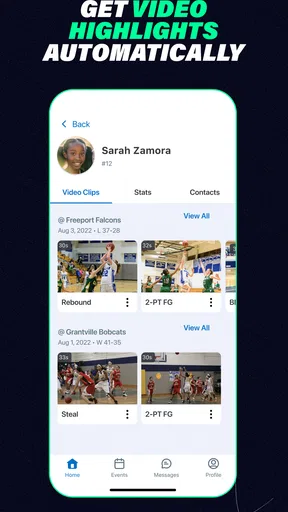
And hey, let’s not forget about the kids! They can check out their stats, see where they’re improving, and even watch replays of their games. It’s a great way for them to stay engaged and motivated.
A Few Things to Keep in Mind
Okay, so while I’m clearly a fan, it’s not all sunshine and rainbows. The app does require a subscription for some of its premium features, like live streaming and advanced stats. But honestly, given the value it provides, I think it’s worth the investment if you’re serious about sports.
Also, having a reliable internet connection is crucial for streaming and live updates. I had a couple of hiccups when my connection was spotty, but nothing too major.
Wrapping It Up
In a nutshell, GameChanger is a fantastic tool for anyone involved in youth sports. It’s packed with features that make managing and following games incredibly convenient. From scorekeeping to streaming, it’s like having a digital assistant dedicated to making your sports experience smoother and more enjoyable.
If you’re looking to enhance your involvement in youth sports, this app is definitely worth checking out. It’s changed the game for me, and I’m pretty sure it’ll do the same for you. Give it a go and see for yourself!
Pros
- User-friendly interface for easy navigation.
- Real-time updates keep you informed instantly.
- Customizable alerts for important events.
- Comprehensive stats tracking for all games.
- Seamless integration with team schedules.
Cons
- Occasional glitches in live scoring updates.
- Premium features require a subscription.
- Limited offline functionality.
- Notifications can be overwhelming.
- Ads can be intrusive for free users.
FAQs for GameChanger
What features does GameChanger offer for managing sports teams?
GameChanger provides comprehensive features for managing sports teams, including live scorekeeping, team and player stats tracking, and communication tools for coaches, players, and parents. The app also offers integration with game schedules, roster management, and the ability to share game highlights and updates in real-time. It's designed to streamline team management and enhance the sports experience.
Is GameChanger free to use, or does it require a subscription?
GameChanger offers both free and premium subscription options. The free version includes basic features like scorekeeping and team messaging. However, for advanced analytics, detailed stats, and video streaming, users can opt for a premium subscription, which is available on a monthly or annual basis. Pricing details can be found within the app’s settings or on their website.
What sports are supported by GameChanger?
GameChanger supports a wide range of sports, including baseball, softball, basketball, and soccer. Each sport comes with tailored features to suit its specific needs, such as different scorekeeping methods and stat tracking options. The app continues to expand its support to include more sports, ensuring comprehensive coverage for various athletic activities.
How user-friendly is the GameChanger app for parents and coaches?
The GameChanger app is designed with ease of use in mind, making it accessible for both parents and coaches. Its intuitive interface allows users to quickly navigate through team schedules, stats, and communication tools. Additionally, the app provides tutorials and customer support to help users maximize their experience, ensuring smooth operation for everyone involved.
Can GameChanger be used offline, and how does it sync data?
GameChanger allows users to score games offline, which is particularly useful in areas with limited connectivity. Once an internet connection is available, the app automatically syncs the data to ensure that all information is up-to-date and accessible to team members. This feature ensures uninterrupted service and reliable data management, even in challenging environments.


